PST files are prone to corruption due to sudden system or application shutdown, large file size, interruption while moving the file, and other reasons. However, Microsoft provides ScanPST – an inbox repair tool that comes automatically installed with Outlook. It is specifically designed to repair corrupt PST files. This tool has certain limitations due to which it fails to repair the file. In this article, we will look into the limitations of this inbox repair tool and see how to repair PST file without ScanPST.
| Table of Contents |
What is PST – Personal Storage Table – File?
It is a data file format used by MS Outlook (POP3 account) to locally store your mailbox content, including emails, attachments, contacts, calendars, tasks and notes. This data file is also used for archiving, backing up, and moving Outlook data from one system to another.
Additionally, Exchange and Office 365 users can export their mailbox data into PST format. This makes it easier to back up important information or move data between accounts and devices.
Why ScanPST Fails to Repair PST Files?
---
Usually, ScanPST fails to repair PST file due to its limitations. Below, we have mentioned some of the common limitations of ScanPST.exe:
- It can repair only minor corruption and inconsistencies in PST files.
- ScanPST may freeze, crash, or stop responding while repairing large PST files.
- It may freeze, crash, or stop responding during repairing large PST files.
- Multiple runs may be required, with no guarantee of success.
- Shows “Errors Fixed” even when issues remain.
- Repaired items are often moved to the “Lost and Found” folder, while permanently corrupted items may be deleted and become unrecoverable.
What to do when ScanPST Fails?
Below we have mentioned some tips or workaround that you can try when the inbox repair tool fails to fix your corrupted PST file:
- Recover your mailbox items from backup file, if available.
- Ensure that you’re running ScanPST with administrative privileges.
- May be your PST file is severely corrupted or damaged.
- PST file is not too large or oversized.
- Outlook and any other related process are closed.
If these didn’t work, then follow the next section to repair PST file without ScanPST.
Repair PST Files when ScanPST.exe Fails
When ScanPST freezes, hangs, or completely fails to repair your PST file, then the best alternative is to use a more advanced Outlook PST repair solution. One such tool you can rely upon is Stellar Repair for Outlook. It is a powerful tool that has the capability to repair even highly corrupted PST files without any size restrictions.
Besides PST, it can save the repaired file items in formats like HTML, MSG, RTF, PDF, etc. Moreover, this tool has an auto-split feature that automatically splits large PST files. This can help prevent further corruption due to large size.
Let’s see the stepwise process to use Stellar Repair for Outlook:
- Visit the official Stellar Repair for Outlook
- Download and install the software.
- Once the installation is complete, launch it.
- Select List Profiles.
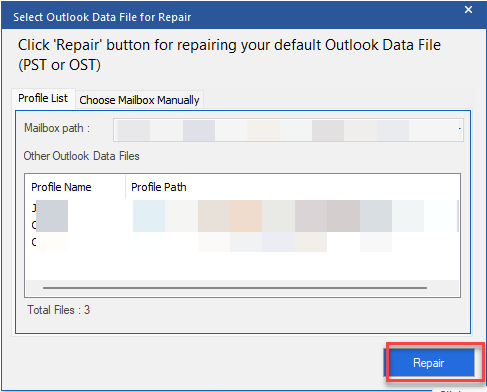
- The software will automatically list the PST file from the default location.
- Click on Repair.
- The scanning process will start. Wait for it to complete.
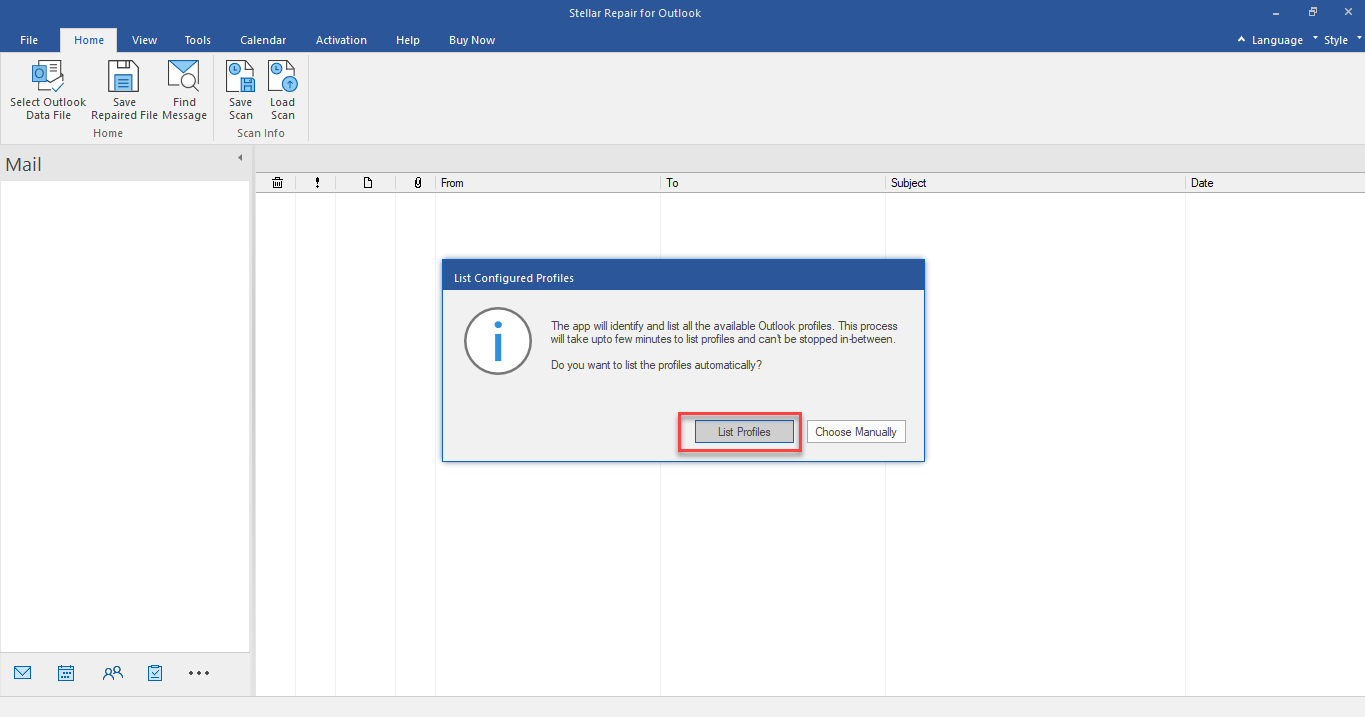
Alternatively, you can click on “Choose Manually” to browse and select PST file manually or from another location.
Now, you will see all the mailbox items of the repaired PST file.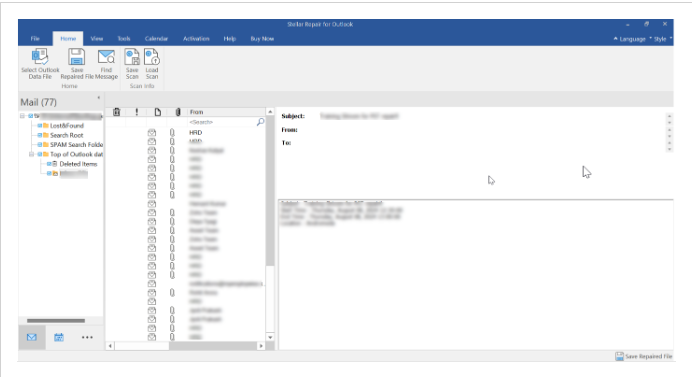
- Next, click on Save Repaired File.
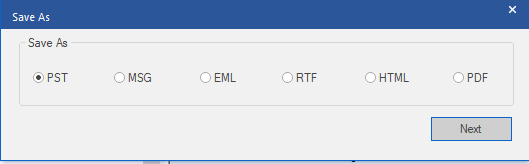
- Select the file format as PST and then click on Next.
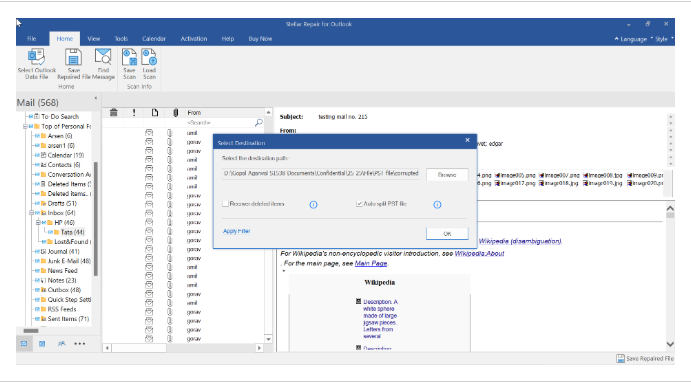
- Browse the location where you want to save the PST file.
- Make sure to select the Recovered Deleted Items and Auto Split File options as per your preference.
- Then click OK.
Now, you can import the repaired file into your Outlook profile by using the Import/Export wizard and access your mailbox items.
To Conclude
ScanPST is a free tool for repairing PST files, but it has some limitations that sometimes cause it to fail. For example, it cannot repair large, severely corrupt PST files. In such situations – there’s only one option – use a professional PST repair tool such as Stellar Repair for Outlook.
This tool can repair severely corrupted PST files irrespective of the size limitations. You can preview recoverable data prior to saving the file. With advanced features, like selective recovery, preview options, etc., this tool is an ideal solution for repairing a PST file when ScanPST.exe fails.
