One of the challenging issues that MariaDB admins usually face is database corruption. The queries raised on Stack Overflow are proof of this. An example of corruption-related issues in MariaDB is:
Error: Got error 185 ‘Incompatible key or row definition between the MariaDB .frm file and the information in the storage engine. You have to dump and restore the table to fix this’ from MyISAM.
Errors like this take your database offline in production and bring whatever depends on it to a stop. The first instinct is almost always the same: restore from backup as fast as possible. If you’ve got a working dump file, MariaDB’s own tools can usually get you there. But that “if” matters more than it sounds — backups go stale, restores fail partway through, and sometimes there’s no backup file sitting around at all. That’s the scenario I actually wanted to test: when the native restore path doesn’t work, does Stellar Repair for MySQL hold up as the backup plan it claims to be? I ran it against a deliberately corrupted MariaDB database to find out.
---
Causes of Corruption in MariaDB
Corruption in the MyISAM or InnoDB tables in MariaDB database can occur due to the reasons mentioned below:
- Copying the table files while the database is already in use.
- MariaDB application crashes while you’re working on the MariaDB tables.
- Multiple MariaDB Server instances sharing the same database directories.
- Bugs in the MariaDB code.
- Sudden restart of MariaDB Server instance.
- Lack of storage space on the disk.
- Faulty hardware.
- Abrupt system shutdown during the read/write operation.
You can check the database for corruption. You can run the mariadb-check command. This command helps you inspect the database tables in MariaDB for corruption issues. It will return OK if the table is clean; else, it will return errors. This command does not support partitioned tables. Here’s how to use this command:
1 2 3 | ./client/mariadb-check [OPTIONS] database [tables] ./client/mariadb-check [OPTIONS] --all-databases |
How to Restore MariaDB Database from Backup?
You can easily restore MariaDB database if the backup is available. To restore backup in MariaDB, you can follow the below methods.
Method 1 – MariaDB Client Utility
The mariadb-dump tool creates a logical backup by generating the SQL statements needed to rebuild your database objects and data. Restoring from that dump file runs through the MariaDB client:
1 | mariadb --user your_username --password < /path/to/your/backupfile.sql |
That principal is followed in this guide: Simple Bash Script For MySQL Database Backup.
- The dump file’s
DROP TABLEandCREATE TABLEstatements mean restoring it overwrites existing tables — there’s real risk of additional data loss - Better suited to testing environments than production
- Slow going on large or complex dump files
Method 2 – Restore with mariabackup
mariabackup is MariaDB’s own open-source backup-and-restore utility, and it works on individual tables, partitions, or the full database using --copy-back or --move-back. The catch is you need to run a --prepare step first to apply transaction logs and make the data files consistent, and the backup has to match the server version you’re restoring onto.
- Needs extra disk space to prepare backups
- Skipping the prepare step risks further corruption
- The backup must come from the same MariaDB version as the restore target
When the Native Methods Don’t Work
All three methods above assume one thing: a backup that actually works. If the backup file is missing, outdated, or the restore itself fails partway through, none of this helps you. That’s the gap Stellar Repair for MySQL is built to fill and the reason I wanted to actually test it rather than just take the marketing copy at face value.
Putting Stellar Repair for MySQL to the Test
To make this a fair test, I needed a database that was actually broken, not just theoretically corrupted. I set up a MariaDB instance with a MyISAM table, then deliberately mismatched the .frm file against the storage engine close enough to recreate the same Error 185 scenario mentioned earlier. After restarting MariaDB, the table threw that exact error on every query, and I had no recent dump file to restore from. In other words: the situation this tool is supposedly built for.
Step 1 – Browse and Select the MariaDB Data Folder
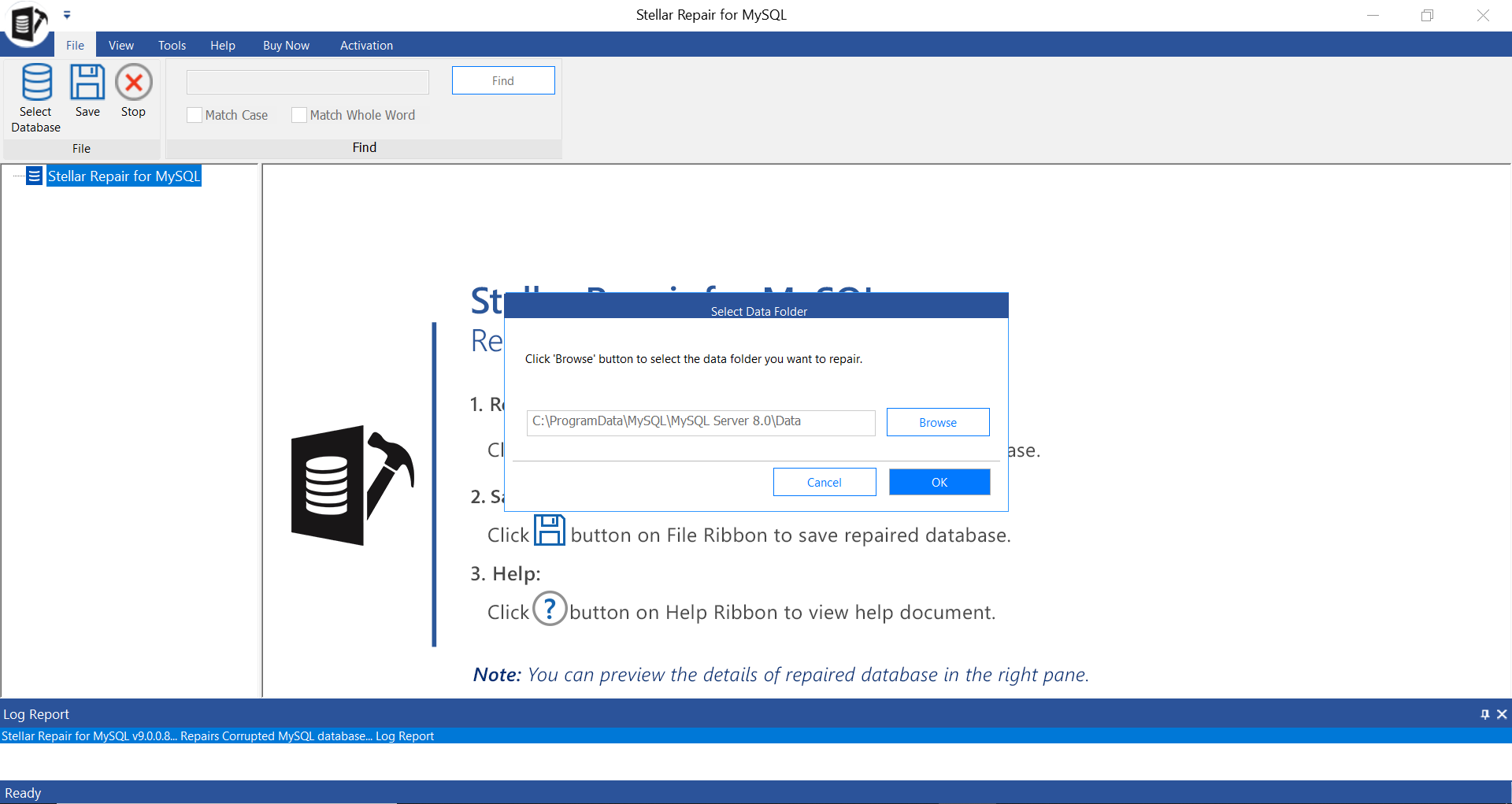
First thing to do is stop the MariaDB service the tool can’t access data files that are still locked by a running server. Once that’s done, open Stellar Repair for MySQL and use the Browse option on the home screen to point it at your MariaDB data directory. On Windows, this folder usually sits inside a hidden ProgramData path, so you may need to enable hidden folders in Explorer first if you haven’t already.
Step 2 – Select the Database to Repair
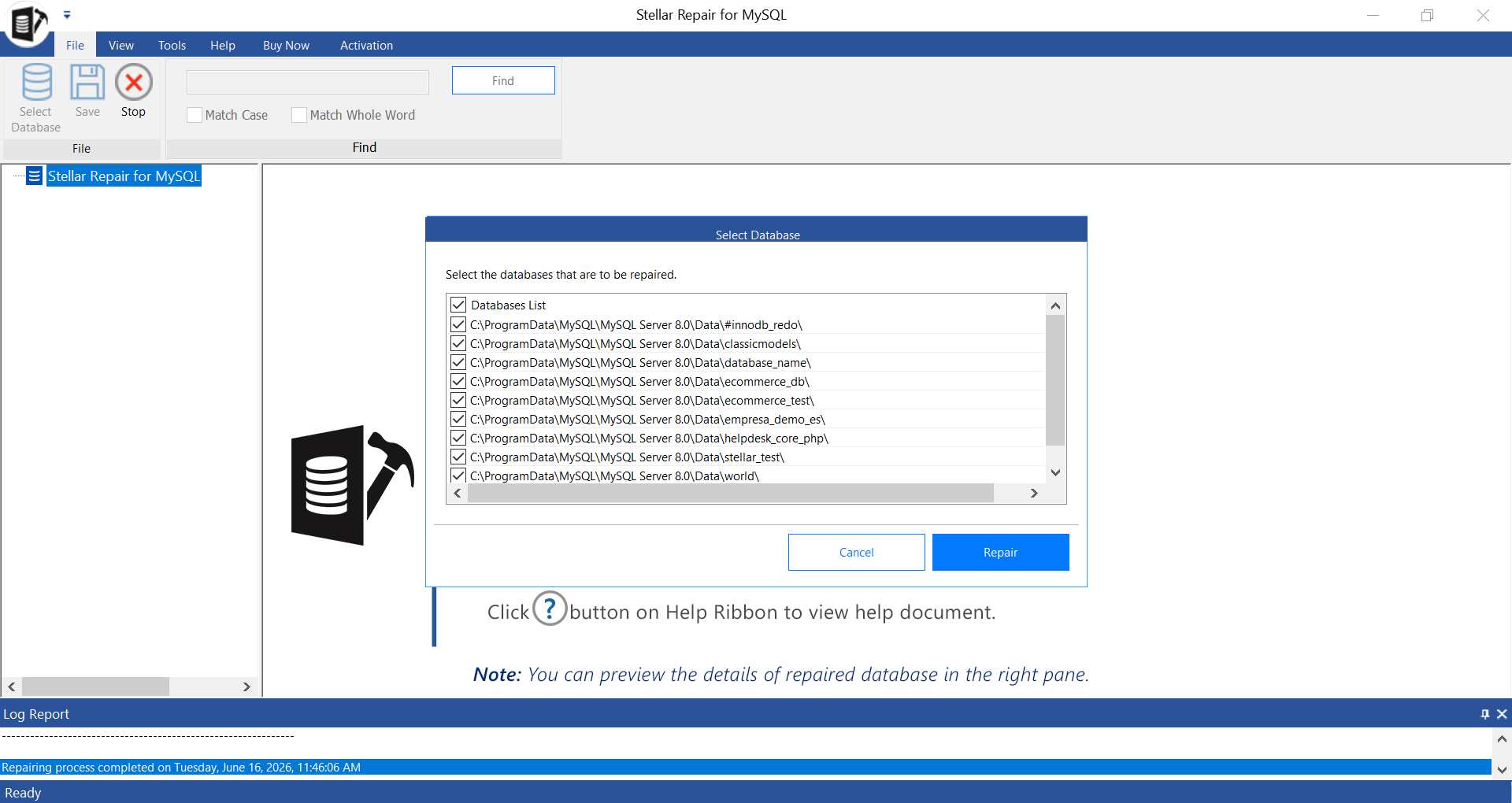
Once the data folder loads, the tool scans it and lists every database it finds inside. I selected the one I’d corrupted and left the rest untouched — you can select multiple at once if you need to, but narrowing it down speeds things up.
Step 3 – Run the Scan
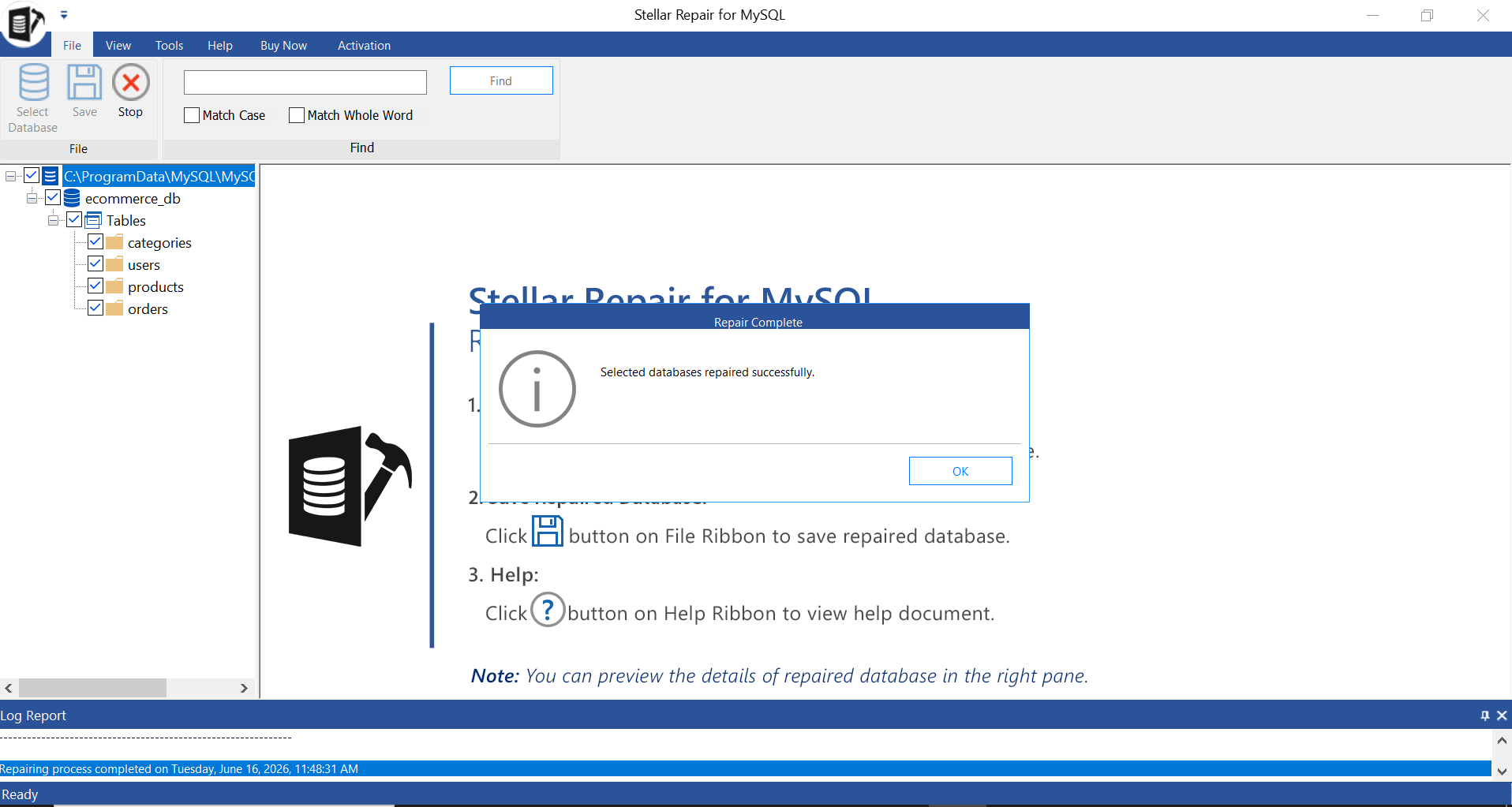
Clicking Repair kicks off the scan. For a database of moderate size, this didn’t take long — a progress bar tracks the stage it’s at, and a notification pops up once it’s finished.
Step 4 – Preview the Recovered Data
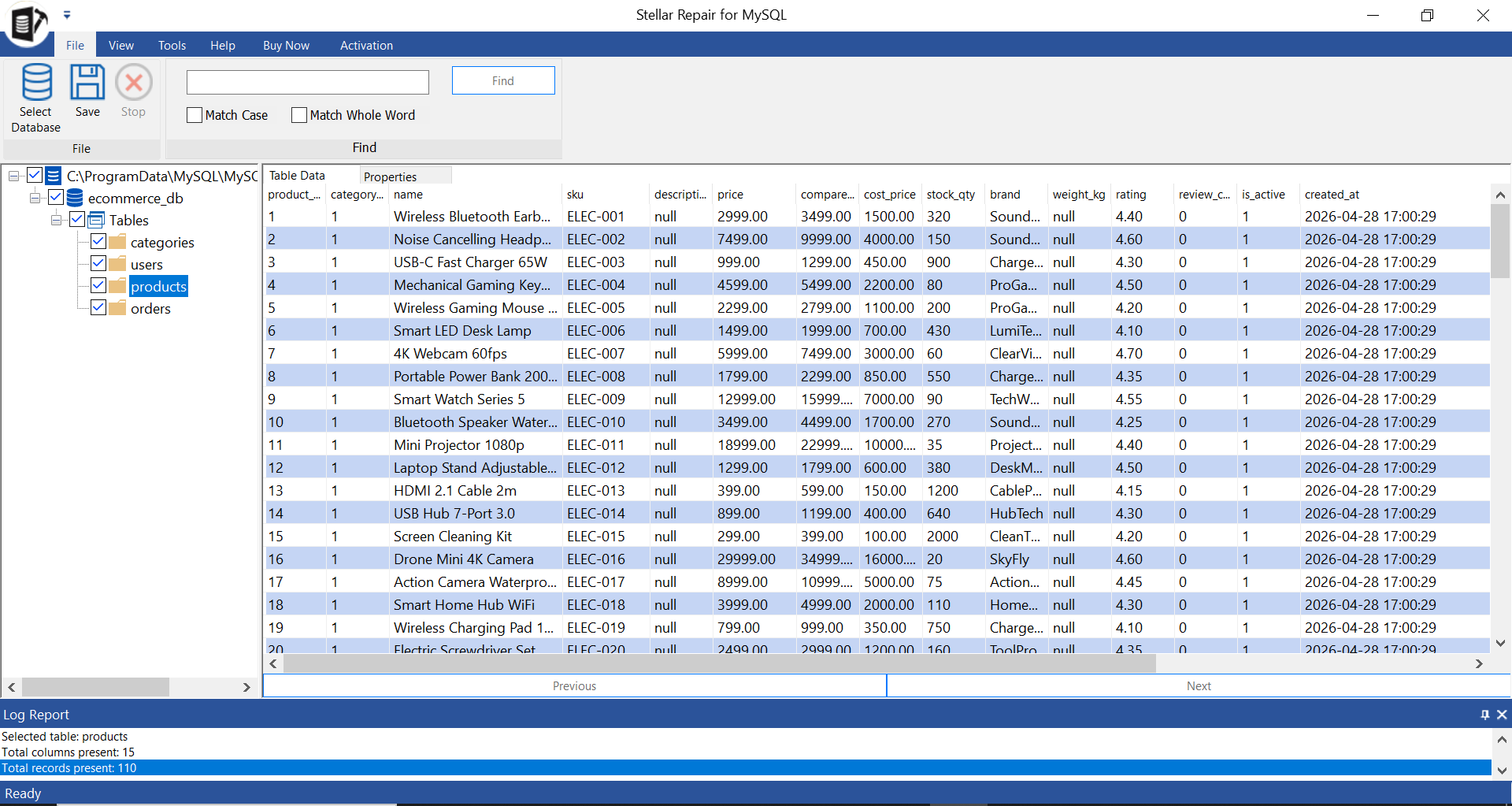
This is the step that actually matters before you spend any money. The tool opens a tree view of everything it found tables, indexes, triggers, the works and lets you click into individual tables to see the actual rows. In my case, the corrupted MyISAM table showed up with its data intact, which was reassuring, but more importantly, it meant I could verify the recovery would actually work before paying for a license.
Step 5 – Save the Repaired Database
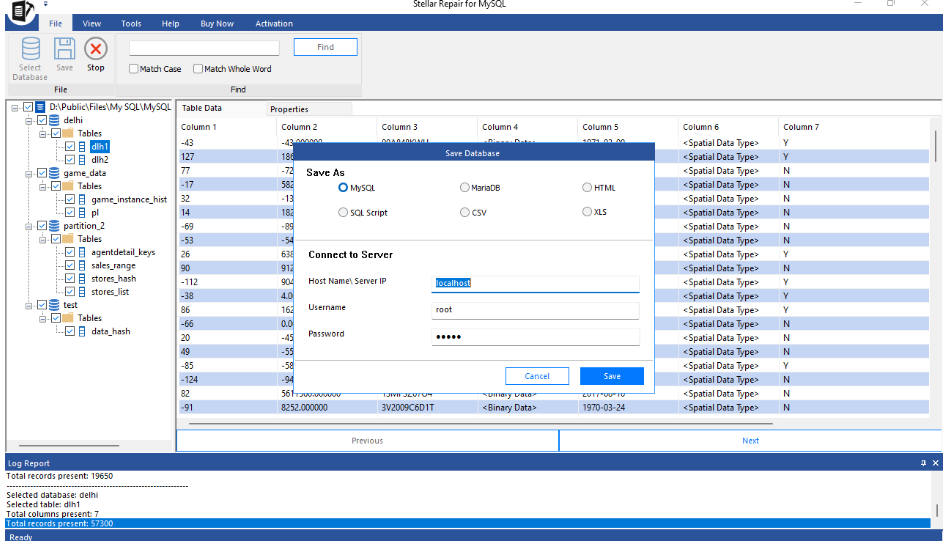
With the license activated, saving gives you a few options: write straight back into a MariaDB/MySQL database, export as an SQL script, or save as CSV, HTML, or XLS. I went with the SQL script option specifically so I could review it before running anything against a live server old habits from working with dump files, honestly. Once imported, a test query against the restored table returned the original data with nothing missing.
Features Worth Knowing About
- Repairs both InnoDB and MyISAM tables, which covers the two storage engines you’ll run into in any real MariaDB/MySQL setup
- Supports MariaDB databases up to version 11.8.3, along with MySQL 3.x through 8.x
- Recovers more than raw table data — indexes, partitioned tables, triggers, and other objects come back too
- Exports to multiple formats — SQL, CSV, HTML, XLS — not just back into a live database
Is It Worth the Price?
Stellar prices the standard license at $199, with a $499 technician/enterprise tier for teams that need it across multiple machines. Compared to redoing lost work after a failed restore, or paying a data recovery service by the hour, $199 for a one-time license is a reasonable trade — especially since the free version lets you scan and preview before committing to anything. That last point is worth repeating: there’s no reason to buy this blind. Run the scan, check the preview, and only pay once you’ve confirmed your data is actually recoverable.
Here’s a comparison table of the above methods:
| Using Stellar Repair for MySQL | Restoring MariaDB from Backup | |
|---|---|---|
| Risk of data loss | No data loss risk | All changes after last backup are lost |
| Repair severely corrupted MariaDB tables | Can repair/restore highly corrupt MariaDB database | It cannot fix corruption; only replaces data |
| Backup is required | It can repair MariaDB database without need of backup | Backup restore fails without valid backup |
| Technical skills | Easy interface, less technical skills are required | Need technical skills to execute utilities like MariaDB dump |
| Saving options | Allows saving the recovered data in multiple formats | Allow saving the recovered data only to MariaDB |
| Overwriting data risk | No such risk | Can overwrite existing database |
Conclusion
A robust database backup and restore approach can help you easily access corrupt MariaDB database. In this post, you saw different methods to restore the MariaDB database from a backup. In case you fail to restore the Mariadb .frm file, you can opt for a professional MySQL/MariaDB repair tool, such as Stellar Repair for MySQL, to repair the corrupted Mariadb database file. It helps you recover the objects in MariaDB database with no data loss. You can download the free trial version of the tool to ascertain its repair capabilities.
| Category | Score |
|---|---|
| Ease of Use | ★★★★★ |
| Recovery Effectiveness | ★★★★★ |
| Feature Set | ★★★★ |
| Version Compatibility | ★★★ |
| Value for Money | ★★★★ |
