• Home
  • Archive
  • Tools
  • Contact Us

The Customize Windows

Technology Journal

  • Cloud Computing
  • Computer
  • Digital Photography
  • Windows 7
  • Archive
  • Cloud Computing
  • Virtualization
  • Computer and Internet
  • Digital Photography
  • Android
  • Sysadmin
  • Electronics
  • Big Data
  • Virtualization
  • Downloads
  • Web Development
  • Apple
  • Android
Advertisement
You are here:Home » How to Repair PST when Scanpst.exe Fails?

By Abhishek Ghosh June 4, 2026 4:45 pm Updated on June 4, 2026

How to Repair PST when Scanpst.exe Fails?

Advertisement

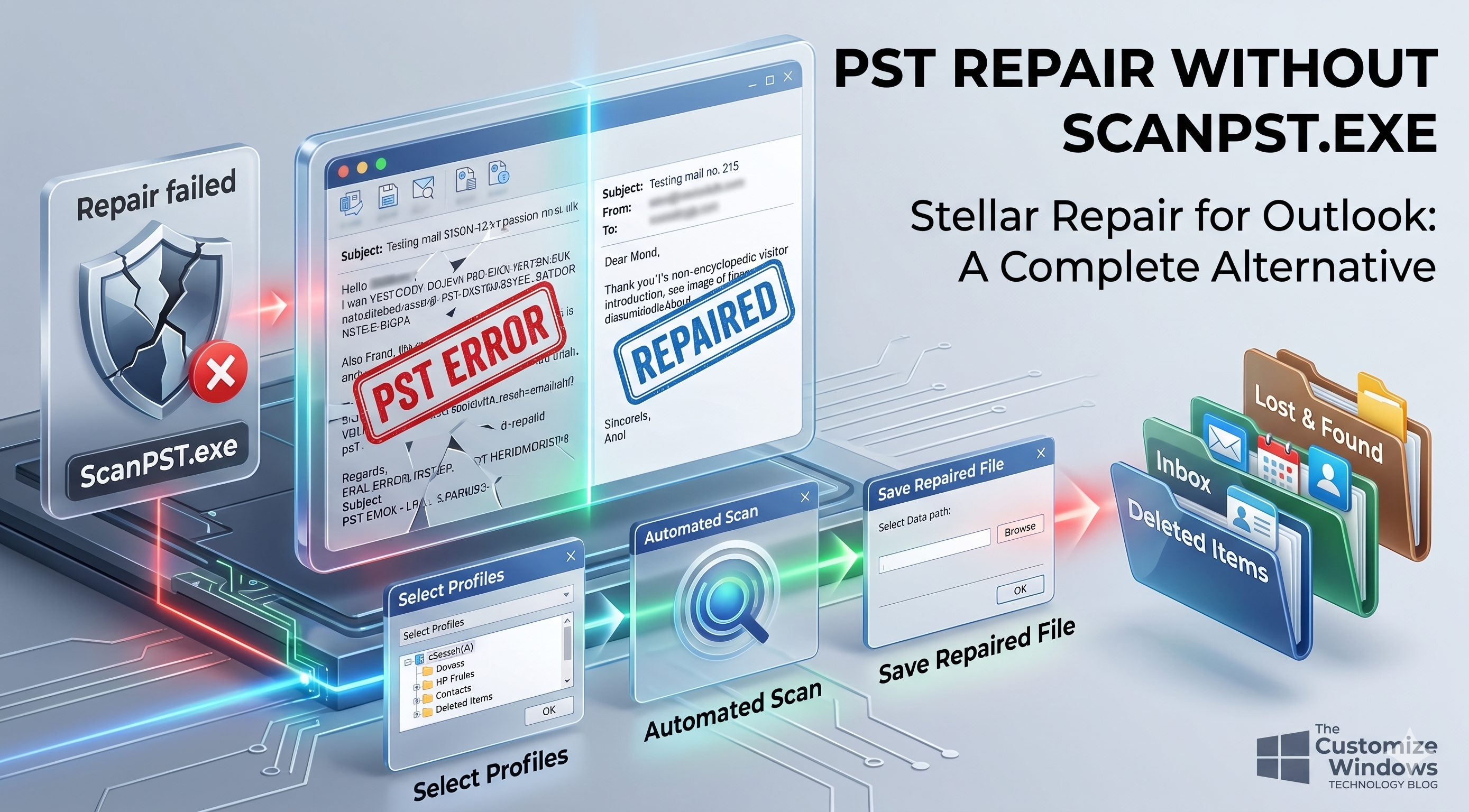
PST files are prone to corruption due to sudden system or application shutdown, large file size, interruption while moving the file, and other reasons. However, Microsoft provides ScanPST – an inbox repair tool that comes automatically installed with Outlook. It is specifically designed to repair corrupt PST files. This tool has certain limitations due to which it fails to repair the file. In this article, we will look into the limitations of this inbox repair tool and see how to repair PST file without ScanPST.
How to Repair PST when Scanpst-exe Fails
Table of Contents

  • 1 Introduction
  • 2 What is PST – Personal Storage Table – File?
  • 3 Why ScanPST Fails to Repair PST Files?
  • 4 What to do when ScanPST Fails?
  • 5 Repair PST Files when ScanPST.exe Fails
  • 6 To Conclude


What is PST – Personal Storage Table – File?


It is a data file format used by MS Outlook (POP3 account) to locally store your mailbox content, including emails, attachments, contacts, calendars, tasks and notes. This data file is also used for archiving, backing up, and moving Outlook data from one system to another.
Additionally, Exchange and Office 365 users can export their mailbox data into PST format. This makes it easier to back up important information or move data between accounts and devices.


Why ScanPST Fails to Repair PST Files?


Advertisement

---

Usually, ScanPST fails to repair PST file due to its limitations. Below, we have mentioned some of the common limitations of ScanPST.exe:

  • It can repair only minor corruption and inconsistencies in PST files.
  • ScanPST may freeze, crash, or stop responding while repairing large PST files.
  • It may freeze, crash, or stop responding during repairing large PST files.
  • Multiple runs may be required, with no guarantee of success.
  • Shows “Errors Fixed” even when issues remain.
  • Repaired items are often moved to the “Lost and Found” folder, while permanently corrupted items may be deleted and become unrecoverable.


What to do when ScanPST Fails?


Below we have mentioned some tips or workaround that you can try when the inbox repair tool fails to fix your corrupted PST file:

  • Recover your mailbox items from backup file, if available.
  • Ensure that you’re running ScanPST with administrative privileges.
  • May be your PST file is severely corrupted or damaged.
  • PST file is not too large or oversized.
  • Outlook and any other related process are closed.

If these didn’t work, then follow the next section to repair PST file without ScanPST.


Repair PST Files when ScanPST.exe Fails


When ScanPST freezes, hangs, or completely fails to repair your PST file, then the best alternative is to use a more advanced Outlook PST repair solution. One such tool you can rely upon is Stellar Repair for Outlook. It is a powerful tool that has the capability to repair even highly corrupted PST files without any size restrictions.

Besides PST, it can save the repaired file items in formats like HTML, MSG, RTF, PDF, etc. Moreover, this tool has an auto-split feature that automatically splits large PST files. This can help prevent further corruption due to large size.

You can also use Online Outlook PST Repair offered by Stellar if your corrupted data file is less than 5 GB. This is a web-based tool which allows you to upload and repair corrupted PST files online without installing Outlook or any other application on your device.

Let’s see the stepwise process to use Stellar Repair for Outlook:

  • Visit the official Stellar Repair for Outlook
  • Download and install the software.
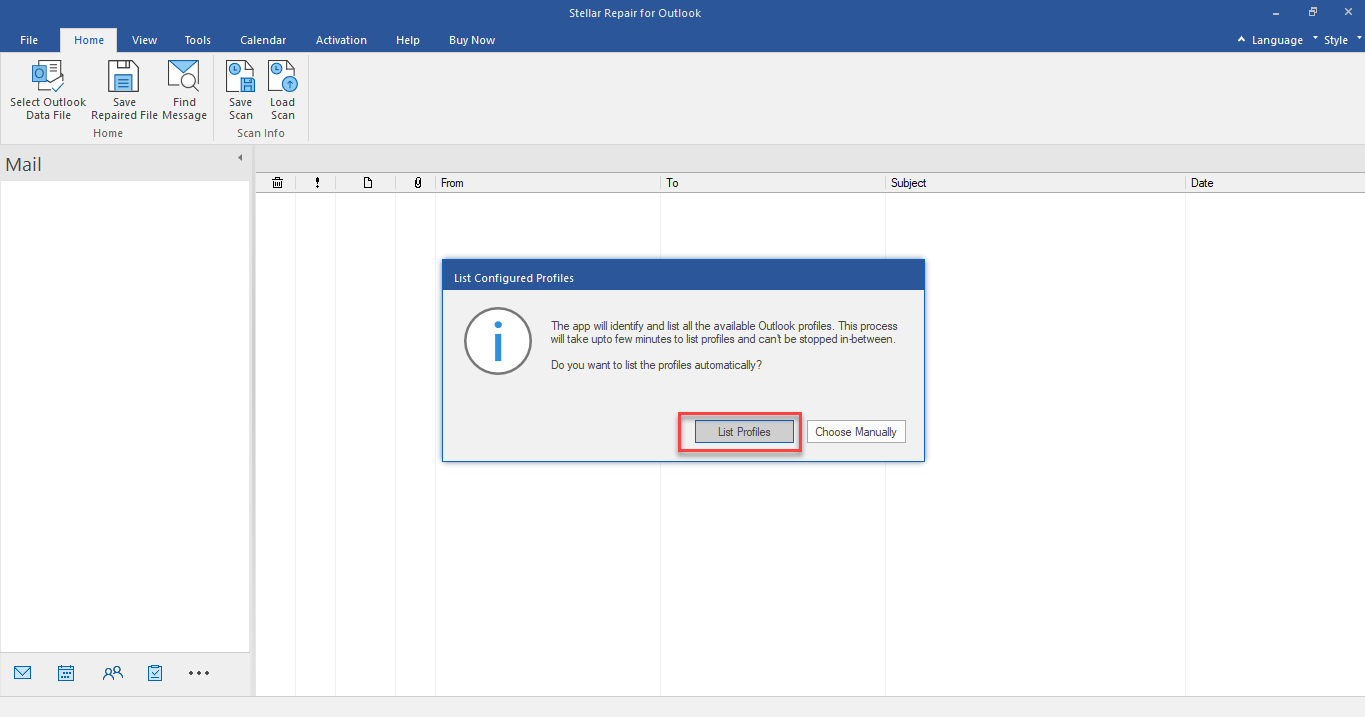
  • Once the installation is complete, launch it.
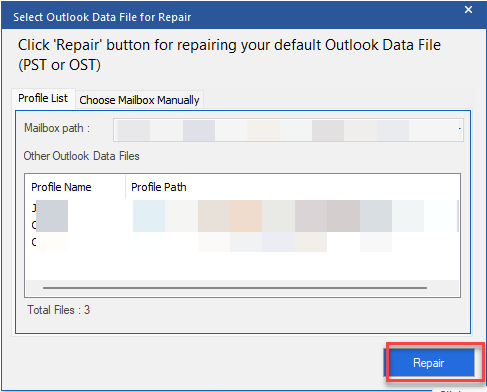
  • Select List Profiles.
  • The software will automatically list the PST file from the default location.
  • How to Repair PST1
    Alternatively, you can click on “Choose Manually” to browse and select PST file manually or from another location.

  • Click on Repair.
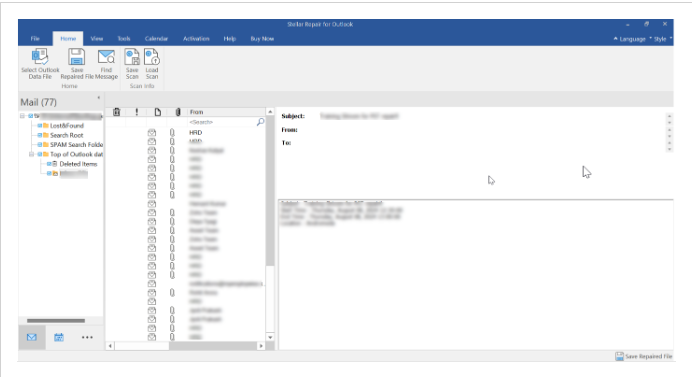
  • The scanning process will start. Wait for it to complete.
How to Repair PST3
Now, you will see all the mailbox items of the repaired PST file.
How to Repair PST2

  • Next, click on Save Repaired File.
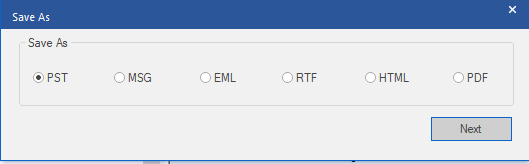
  • Select the file format as PST and then click on Next.
  • How to Repair PST5
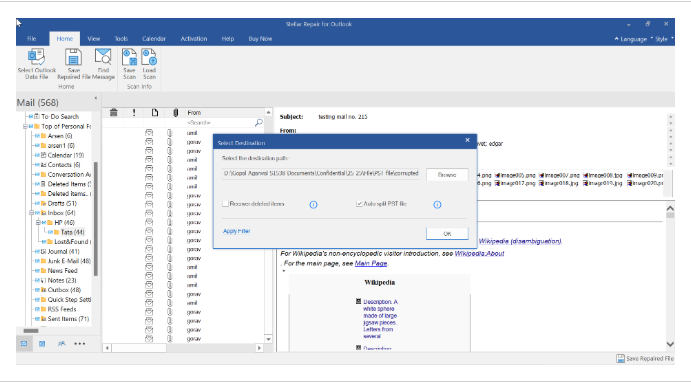
  • Browse the location where you want to save the PST file.
  • How to Repair PST4
  • Make sure to select the Recovered Deleted Items and Auto Split File options as per your preference.
  • Then click OK.

Now, you can import the repaired file into your Outlook profile by using the Import/Export wizard and access your mailbox items.


To Conclude


ScanPST is a free tool for repairing PST files, but it has some limitations that sometimes cause it to fail. For example, it cannot repair large, severely corrupt PST files. In such situations – there’s only one option – use a professional PST repair tool such as Stellar Repair for Outlook.
This tool can repair severely corrupted PST files irrespective of the size limitations. You can preview recoverable data prior to saving the file. With advanced features, like selective recovery, preview options, etc., this tool is an ideal solution for repairing a PST file when ScanPST.exe fails.

Facebook Twitter Pinterest

Abhishek Ghosh

About Abhishek Ghosh

Abhishek Ghosh is a Businessman, Surgeon, Author and Blogger. You can keep touch with him on Twitter - @AbhishekCTRL.

Here’s what we’ve got for you which might like :

Articles Related to How to Repair PST when Scanpst.exe Fails?

  • Effective Ways to Prevent Outlook Mailbox Corruption

    Microsoft Outlook is one of the most important parts of the professional and corporate sector. MS Outlook is undoubtedly the greatest email management system. The application deals with notes, calendars, tasks, and contacts, and manages thousands of emails every day. Just like other email clients, MS Outlook stores the data files in a specific format. […]

  • Repairing WordPress Database : Using Cloud Database Server

    Repairing WordPress Database is easy by using Cloud Database Server like from The Rackspace Cloud which provides MySQL database server with PHPmyAdmin software.

  • Review of Stellar Repair for MS SQL Database

    MS SQL Server is a commonly used server software for medium and large-sized enterprises for their database storage and analysis requirements. MS SQL Express and Developer editions are free while the major server edition costs a $530 license fee. Despite the higher cost. There is widespread adoption of SQL database because of the growing application […]

  • Glossary of dangerous dll files of Windows operating system

    We have gathered information about some well known dangerous dll files of Windows 7 and other operating system. It will work as reference to delete them easily if someone faces such dll file.

performing a search on this website can help you. Also, we have YouTube Videos.

Take The Conversation Further ...

We'd love to know your thoughts on this article.
Meet the Author over on Twitter to join the conversation right now!

If you want to Advertise on our Article or want a Sponsored Article, you are invited to Contact us.

Contact Us

Subscribe To Our Free Newsletter

Get new posts by email:

Please Confirm the Subscription When Approval Email Will Arrive in Your Email Inbox as Second Step.

Search this website…


vpsdime

Popular Articles

Our Homepage is best place to find popular articles!

Here Are Some Good to Read Articles :

  • Cloud Computing Service Models
  • What is Cloud Computing?
  • Cloud Computing and Social Networks in Mobile Space
  • ARM Processor Architecture
  • What Camera Mode to Choose
  • Indispensable MySQL queries for custom fields in WordPress
  • Windows 7 Speech Recognition Scripting Related Tutorials

Social Networks

  • Pinterest (24.3K Followers)
  • Twitter (5.8k Followers)
  • Facebook (5.7k Followers)
  • LinkedIn (3.7k Followers)
  • YouTube (1.3k Followers)
  • GitHub (Repository)
  • GitHub (Gists)
Looking to publish sponsored article on our website?

Contact us

Recent Posts

  • How to Repair PST when Scanpst.exe Fails?June 4, 2026
  • Cloud-Powered Play: How Streaming Tech is Reshaping Online GamesSeptember 3, 2025
  • How to Use Transcribed Texts for MarketingAugust 14, 2025
  • nRF7002 DK vs ESP32 – A Technical Comparison for Wireless IoT DesignJune 18, 2025
  • Principles of Non-Invasive Blood Glucose Measurement By Near Infrared (NIR)June 11, 2025
PC users can consult Corrine Chorney for Security.

Want to know more about us?

Read Notability and Mentions & Our Setup.

Copyright © 2026 - The Customize Windows | dESIGNed by The Customize Windows

Copyright  · Privacy Policy  · Advertising Policy  · Terms of Service  · Refund Policy